What Is EXIF Data? The Hidden Info in Every Photo You Share
The Thing Nobody Tells You When You Upload a Photo
You take a photo. You upload it to an image-sharing site. You share the link. Simple.
What actually happened: you sent someone a file containing the precise GPS coordinates of where you were standing when you pressed the shutter. Your device model. The exact second the photo was taken. And in some cases, your name.
You did not choose to share any of that. Your phone embedded it automatically, silently, in every image it captured. And when you uploaded the file, that hidden data was uploaded with it.
Every photo you take with your phone or digital camera contains hidden information called EXIF data that can quietly reveal a lot more than just the image itself — such as where and when you took the photo, what device you used, and what software you used to edit it. In the wrong hands, this invisible metadata can be used to track your location, piece together your daily routines, or dox you or your loved ones.
This is not a theoretical risk. It has happened to real people, and it almost certainly happened to people who uploaded photos to ChatPic — a platform that stored this data for years with no moderation and no protection.
What EXIF Data Actually Is
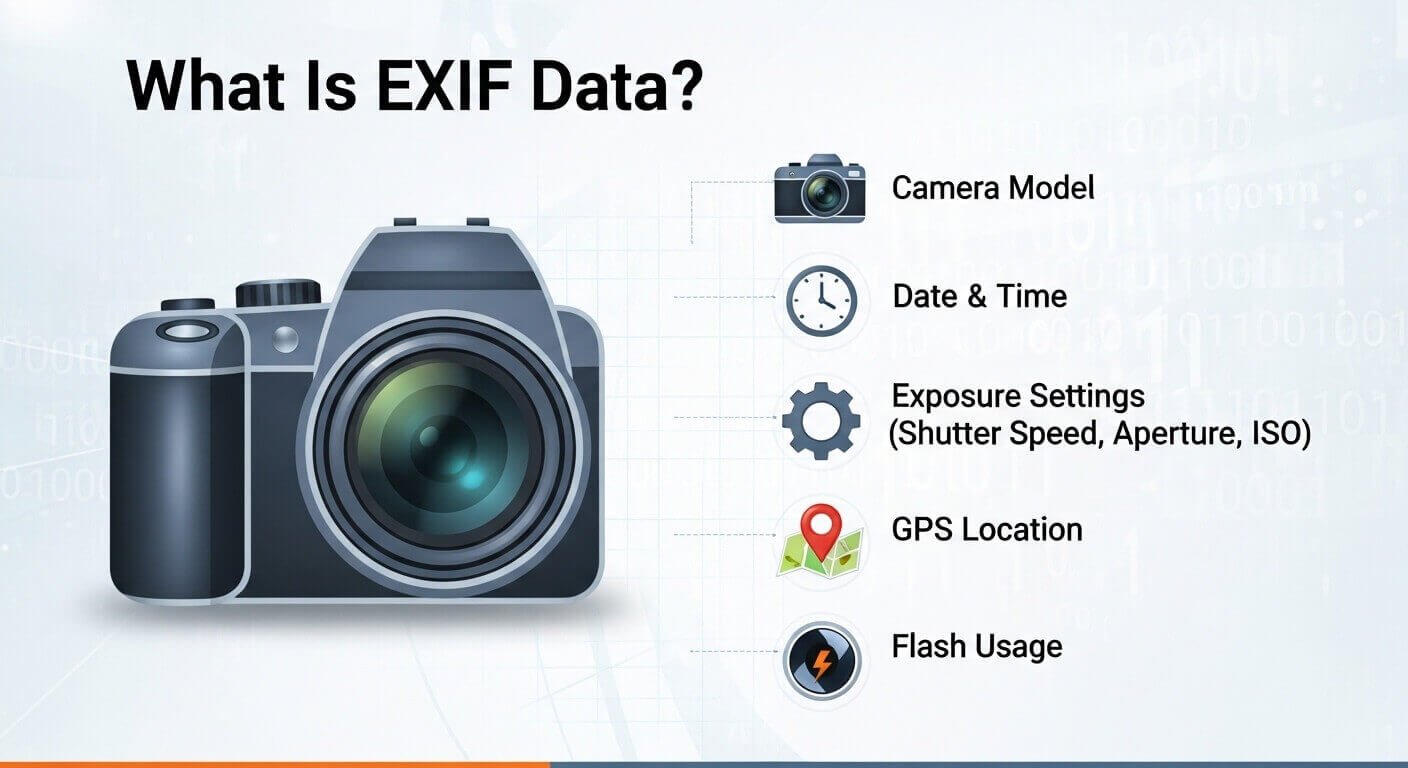
EXIF stands for Exchangeable Image File Format. It is a standard created in the 1990s to help cameras record technical information alongside image pixels — things like shutter speed, aperture, and ISO — so photographers could review their settings later.
The standard made sense when cameras were standalone devices with no internet connection and no GPS chip. It became a privacy issue when smartphones arrived with location services built in, always connected, and set to record GPS coordinates in every photo by default.
EXIF data is hidden information automatically embedded in a photo when it’s taken. Think of it as a digital fingerprint that travels with your image file.
Here is what that fingerprint typically contains:
- GPS coordinates: Latitude, longitude, and altitude pinpoint exactly where you took the shot, accurate within a few metres. If you photographed your front door, your front door’s address is in the file.
- Timestamps: Precise date and time of capture, down to the second. This tells anyone who downloads the image exactly when you were at that location.
- Device identifiers: Camera make and model, serial numbers, lens specifications. This links the image to a specific physical device — yours.
- Software information: The operating system version and camera app running when the photo was taken. On some devices, this includes the phone’s owner’s name if it was set up under a personal account.
- A thumbnail of the original image: EXIF often includes a low-resolution thumbnail of your original, unedited image. Crop out a sensitive detail in your photo editor? The thumbnail still shows the full frame.
That last point surprises most people. Editing a photo before sharing it does not remove EXIF data. Neither does compressing it. Standard image compression — whether JPEG, WebP, or AVIF — targets pixel data and colour information to reduce file size. EXIF metadata lives in a separate data structure within the file container. Most compression tools optimize the image payload but copy the EXIF block unchanged from input to output. Result: your 5MB photo becomes 400KB, but the GPS coordinates revealing your home address remain intact.
Why This Matters for Anyone Who Used ChatPic
ChatPic did not strip EXIF data from uploaded images. This was never officially stated — it was simply never addressed. The platform had no moderation infrastructure, no privacy processing pipeline, and no stated data handling policy. Images were uploaded and stored exactly as they arrived.
EXIF data represents one of the biggest privacy risks in our photo-sharing culture. For ChatPic users, the risk was compounded by two factors that did not apply on mainstream platforms.
First, ChatPic images were publicly accessible to anyone with the link — not just people the uploader trusted. On Instagram or Facebook, a photo shared with friends goes to people who know you. On ChatPic, a photo uploaded to a public category could be viewed and downloaded by millions of anonymous users, including people with harmful intentions.
Second, ChatPic’s anonymous design meant there was no way for an uploader to track who downloaded their images, request deletion, or even verify that their content was only being seen by intended recipients. The risk associated with EXIF data rarely crosses users’ minds, assuming they are even aware of its existence. Most ChatPic users had no idea this issue existed at all.
If you uploaded photos to ChatPic between 2014 and 2023 and those photos were taken on a GPS-enabled smartphone, your location data was embedded in those files and accessible to anyone who downloaded them for the entire time the platform was live.
Real Consequences — This Is Not Hypothetical
A cautionary example is tech pioneer John McAfee, who was tracked down in 2012 because a photo file he published contained GPS coordinates in the metadata. He was attempting to hide his location at the time. The photo — posted publicly, appearing to show nothing incriminating — contained the precise GPS coordinates of where it was taken. Someone extracted the EXIF data and published his location within hours.
A 2015 report documented domestic violence victims tracked through photo metadata shared on social media. These were people actively trying to hide from abusers. Their photos, shared in what felt like safe contexts, carried GPS data that told a different story.
Real estate photographers reported break-ins at properties they had photographed, with thieves using GPS data to identify vacant homes during staging.
In 2014, news outlets inadvertently published photos with GPS data revealing confidential meeting locations in conflict zones.
By consistently examining the EXIF data from photos shared online by an individual, a malicious actor could track patterns in the individual’s movements or habits, potentially facilitating stalking or other harmful actions.
These are not edge cases from a decade ago. The most immediate security concern surrounding EXIF data is location exposure. Geotagging capabilities embedded in modern devices can pinpoint exact geographical locations. In 2026, every modern smartphone records GPS data by default. The risk is present in every photo taken on every phone — unless the user actively turns it off or removes it before sharing.
Which Platforms Protect You — And Which Do Not
The assumption that popular platforms automatically handle this is understandable but wrong.
Not one of the six platforms tested provides complete metadata protection across all sharing contexts. Every platform has at least one sharing mode — typically direct messages, file sharing, or API uploads — where GPS coordinates can survive transmission to recipients.
Here is the picture for platforms ChatPic users are most likely to be using now:
- Instagram strips GPS from photos posted to the main feed and Stories. Instagram Direct Messages tell a different story. In DM testing, some GPS information survived when photos were shared using higher-quality options. Also: Instagram’s data practices documentation confirms that the platform collects location information from photos you upload — meaning original EXIF data, including GPS, is stored by Instagram even when stripped from what other users see.
- WhatsApp has variable behaviour. Photos shared as files in Messenger conversations may retain EXIF data, including GPS. Standard photo messages typically compress images and strip GPS. Sharing as a document does not.
- Facebook Marketplace is a specific risk. Testing of Marketplace listing photos found more variable metadata handling than the main feed, with GPS stripping less consistent. Given that Marketplace photos are viewed by strangers who are specifically interested in your physical location, metadata exposure in this context carries particular risk.
- PostImage, ImgBB, Catbox, Imgbox — the most commonly recommended ChatPic alternatives — do not automatically strip EXIF data. Files are stored and served exactly as uploaded. Anyone who downloads your image from these platforms receives the full original file, including all metadata.
- Imgur strips GPS and most EXIF data from uploaded images automatically. It is one of the safest options for anonymous image sharing, specifically because of this.
- Google Photos and iCloud both preserve EXIF data internally for your own use (so you can search by location and date), but strip GPS when you share via public link. Both services have a feature that lets you share photos without that information attached.
The safest rule is not to rely on any platform to handle this for you. Always remove EXIF data before sharing photos, regardless of the platform. It is better to be safe than sorry when it comes to your privacy.
How to Check What EXIF Data Your Photos Contain Right Now
Before removing anything, it helps to see what is actually in your files. You may be surprised.
- On Windows: Right-click the image file, select Properties, then go to the Details tab. You will see GPS coordinates, device model, timestamp, and any other embedded fields listed clearly. No special software required.
- On Mac: Secondary-click the image and select Get Info. Or open the image in Preview and go to Tools → Show Inspector → the EXIF tab shows the full metadata set.
- On iPhone: Open the Photos app and swipe up on any photo. A map will appear if GPS data is present, showing exactly where the photo was taken. Below the map are the device model, date, and time.
- On Android: Open Google Photos and swipe up on a photo. Location, device, and timestamp data appear in the Details panel. If no location is shown, the GPS was either disabled when the photo was taken or has already been removed.
How to Remove EXIF Data Before You Share — Every Method
There are several ways to do this, depending on your device and how much control you want.
Method 1 — Remove it in Windows (30 seconds, no software needed)
Right-click the image file → Properties → Details tab → click “Remove Properties and Personal Information” at the bottom of the panel → select “Remove the following properties from this file” → click “Select All” → OK.
Windows creates a copy of the file with all metadata stripped. The original remains unchanged. This works on any JPEG or PNG and takes under a minute.
Method 2 — Disable GPS before you take the photo (iPhone)
On iPhone, go to Settings → Privacy and Security → Location Services → Camera and tap Never. From that point forward, photos taken with the native Camera app will not record GPS coordinates. This does not affect photos already taken — only new ones.
Method 3 — Disable GPS before you take the photo (Android)
Open the Camera app, go to Settings, and toggle off Location tag. The exact location of this setting varies by device manufacturer. On Samsung, it is in Camera → Settings → Location tags. On Google Pixel, it is Camera → Settings → Save location.
Method 4 — Remove location from a specific photo (iPhone iOS 16+)
Open the photo in the Photos app → tap the information icon (the circle ⓘ at the bottom of the screen) → tap Adjust below the location shown → select None. This removes GPS from that specific photo without affecting any others.
Method 5 — Use a screenshot instead
One technique is to just take a screenshot of the photo and share that instead. Screenshots typically do not include the same kind of sensitive metadata as a camera. A screenshot is a new image file created by the operating system — it does not inherit the original photo’s EXIF data. This is the fastest method for one-off situations, with a small trade-off in image quality.
Method 6 — Use a browser-based EXIF remover tool
For bulk removal or for images on a computer, a browser-based EXIF remover tool lets you upload an image, strips all embedded metadata, including GPS, device model, and timestamp, and returns a clean file for download. No installation required, works on any device with a browser. Look for tools that process images locally in your browser rather than uploading to a server — these offer better privacy because your image never leaves your device.
Method 7 — ExifTool (for technical users or bulk processing)
ExifTool is a free, open-source command-line tool that reads and writes EXIF data in any image format. For someone managing large volumes of images — photographers, designers, anyone running a website — ExifTool can strip metadata from hundreds of files in a single command:
exiftool -all= /path/to/your/images/This removes all metadata from every image in the specified folder. ExifTool is available for Windows, Mac, and Linux at exiftool.org.
EXIF Data and UK Law — What You Need to Know
The General Data Protection Regulation (GDPR) treats EXIF as personal data when it can directly or indirectly identify individuals. Under GDPR Article 4, GPS metadata is classified as protected information.
This means that if you run a website, a business, or any platform where users upload images — and those images contain EXIF data including GPS coordinates — you may be processing personal data under UK GDPR without a lawful basis. This creates legal liability.
German courts have already fined real estate photographers for sharing property photos containing precise GPS coordinates. UK enforcement is following the same direction as EU enforcement on this issue.
For individual users, the legal position is simpler: you are not legally obligated to strip EXIF data from your own photos before sharing them. But you are taking a real personal risk if you do not — particularly when sharing with people you do not fully trust or on platforms whose data handling you cannot verify.
The Connection to ChatPic’s Shutdown
ChatPic’s failure to moderate non-consensual intimate images (NCII) was the primary reason for its closure. But EXIF data made that failure significantly worse. Every non-consensual image uploaded to ChatPic that was taken on a GPS-enabled phone potentially exposed the location of the person photographed. In the most serious cases — intimate images taken without consent — this meant that the victim’s home address, workplace, or regular locations could be extracted from files hosted on an unmoderated public platform, by anyone, at any time.
This is not speculative. It is the reason that organizations working on image-based abuse consider metadata stripping to be as important as content moderation itself. The two problems are connected. A platform that stores and serves unmodified image files while refusing to moderate content is not just failing on one dimension — it is compounding the harm of every harmful image it hosts.
What to Do Right Now
If you ever uploaded photos to ChatPic or to any anonymous image host that does not strip EXIF data, the practical steps are straightforward.
The photos that were on ChatPic are gone — the platform is offline, and the data is no longer accessible. You cannot retroactively remove EXIF from those files.
For photos you are sharing now and in the future:
First, check your phone’s camera settings today and turn off location tagging if it is currently enabled. This takes two minutes and prevents the problem from occurring in every photo you take going forward.
Second, before uploading any photo to PostImage, ImgBB, Catbox, Imgbox, or any other platform that does not automatically strip metadata, remove EXIF using one of the methods above.
Third, if you share photos via WhatsApp, Discord, or email as original files — not compressed versions — check whether GPS data is present before sending. The Windows Properties method or iPhone Photos swipe-up are the fastest ways to check.
EXIF data is invisible but rich in sensitive information. And if you share photos without removing it first, you could be putting your privacy — and that of your family, friends, coworkers, and clients — at risk.
Frequently Asked Questions
Does removing EXIF data affect image quality?
Removing EXIF deletes metadata only and does not change the visible pixels or overall quality of the photo. The image looks exactly the same. The only thing removed is the hidden data layer.
Do all smartphone cameras record GPS by default?
Yes, on most modern smartphones. GPS recording is enabled by default when you first set up the device and grant the Camera app location permissions. You need to actively disable it in settings if you do not want it recorded.
Does Instagram protect me from EXIF exposure?
For public feed posts, yes — Instagram strips GPS from what other users see. For direct messages and file shares, the protection is incomplete. Assuming any platform automatically protects your metadata in all scenarios is a dangerous privacy mistake.
Can someone track me using EXIF data from old photos?
If photos you shared in the past contained GPS data and were downloaded by other people before being removed from a platform, yes — those files still contain your historical location data. There is no way to retroactively strip metadata from files that have already been distributed.
If I edit a photo before sharing, does that remove EXIF?
No. Standard image editing targets pixel data. EXIF metadata lives in a separate data structure within the file container. Most editing tools leave the EXIF block unchanged. Use a dedicated EXIF removal method before sharing.
What is the fastest way to share a photo without any metadata?
Take a screenshot of the photo and share that instead. Screenshots typically do not include the same kind of sensitive metadata as a camera image.